FDA's Quality Management System Regulation (QMSR) took effect February 2, 2026, and incorporates ISO 13485:2016 by reference. Together they set the requirements for a medical device QMS. See our QMSR guide.
However, neither QMSR nor ISO 13485 specifies the QMS tools you use to meet those requirements. It's entirely possible to manage, say, your CAPAs, on a spreadsheet.
The question is, should you?
QMS tools are the software modules in a digital QMS that run specific quality processes: risk, design controls, documents and changes, BOMs, CAPA, complaints, training, and audits. The best ones connect those records, so a change in one shows up everywhere it matters.
Here are the eight that any medical device QMS software should include, plus three MedTech tools outside your QMS. Looking for classic techniques such as Pareto charts instead? See the seven basic quality tools.
QMS Tool #1: Risk Management
Risk management is integral to every MedTech company.
With QMSR in effect, FDA incorporates ISO 13485:2016 by reference, and ISO 13485 points to ISO 14971 for risk management.
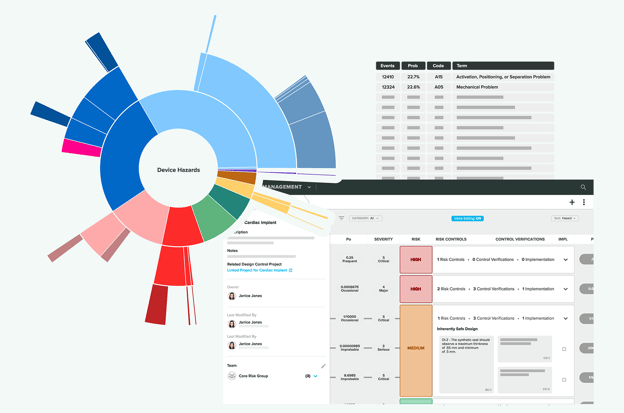
So, yes, any risk management software you're using in your QMS should be capable of aligning with ISO 14971:2019 out of the box. It should also be able to cover your risk management needs throughout the entire lifecycle of your product, whether you're assessing risk for the first time or managing risk alongside your post-market surveillance activities.
That is what our risk management software is built to do.
 Greenlight Guru Risk Solutions
QMS Tool #2: Design Controls
I've seen design controls managed on spreadsheets before, and I hope I never have to see that again. If you're using spreadsheets or other general-purpose QMS tools to manage your design controls, you should expect to dedicate at least one full-time employee to that job.
That's because your design controls are really a traceability matrix. And when you update your design (which will happen often throughout the development process), you'll have to manually ensure that all those little spreadsheet cells are changed and reflect the most recent revision.
Or you can get a QMS software solution with purpose-built, collaborative design controls software that ensures changes are reflected throughout your quality management system and lets you generate a design history file (DHF) with a single click.
Which, by the way, is exactly what we built our Design Control software to do: document, track, and trace all aspects of your design control process.
 Greenlight Guru Design Control Software
QMS Tool #3: Document Management (and Change Management)
The QMS tools for document management are imperative for MedTech companies, given the stringent regulations outlined in Section 4.2.4 of ISO 13485:2016. This sets the standard for document approval, distribution, and modifications.
In a nutshell, any document, whether new or revised, must be reviewed and approved before it is issued. That review will also require a date and signature by the approver. And if you're using electronic signatures, you'll also need to be in compliance with 21 CFR Part 11.
Managing documents and signatures by hand quickly becomes an enormous amount of work. A digital QMS handles it with dedicated document management and change management workflows built to support compliance with Part 820 and Part 11.
 Greenlight Guru Document Management Software
QMS Tool #4: BOM Management (Product Lifecycle Management)
Every medical device also needs a bill of materials (BOM). It's the ingredient list for your medical device. And because products evolve over time (trust me, they all do), your BOM will also change at some point.
All it takes is a change to one of your parts once the device is on the production floor. You'll need a way to quickly and easily see what's in your BOM, change it to ensure that it reflects the most recent update to your product, and connect it to the rest of your QMS (like a design output within your design controls). I'm not sure if there's an Excel formula for that, but I really doubt it.
It's easiest to simply have a QMS tool that allows you to build and manage multi-level BOMs within a connected QMS ecosystem. And because that would be easiest, we built our Products workspace to create a seamless flow from your DHF to your product development process, all while meeting the requirements of ISO 13485.
 Greenlight Guru Product Management Software
QMS Tool #5: CAPA Management
CAPA, CAPA, CAPA. The number one reason for FDA 483s for as long as any of us can remember.
Getting your CAPA management right isn't just about avoiding FDA findings, however. It's really about maintaining the overall health of your QMS. If CAPAs are languishing for months or even years because there isn't a system in place for tracking and investigating them properly, that's not a great sign for your organization overall.
Any QMS worth its salt should include strong CAPA management software that helps you resolve your investigations in a timely and compliant manner.
 Greenlight Guru CAPA Management Software
QMS Tool #6: Customer Feedback (Complaints)
CAPA may be number one for FDA findings, but complaints are up there as well. You absolutely need a QMS tool capable of capturing customer feedback about your products and ensuring that feedback gets funneled through the proper channels.
In some cases, complaints and other feedback will inform the design of your product. For instance, a series of similar customer complaints may identify an issue with the product that can only be fixed through a design change.
But even if it doesn't lead to a design change, it's important to capture customer feedback, which may go on to inform your risk management. Maybe initial feedback leads you to consider the threshold at which complaints would drive a design change.
And let's not forget that you are legally required to submit serious complaints regarding adverse events and product problems according to FDA's Medical Device Reporting (MDR) requirements.
Your ability to collect customer feedback and get it to the right people within your organization is paramount to building safe and effective medical devices. The best QMS tools make that possible.
Many QMS tools lack the traceability to show what a complaint affects. A digital QMS captures complaints in the same system as your design and risk records, so you can see everything a piece of feedback touches.
 Greenlight Guru Complaint Management Software
QMS Tool #7: Training Management
Training management is a constant battle for most medical device companies. Not only do you need to make sure that people are completing required training, you need to have it documented and ready to show FDA inspectors or auditors who come knocking.
Without a training management tool, someone has to chase people, update records, and pull documents by hand. That slows you down and weakens audit readiness.
The best QMS tools come equipped with training management software that tracks this for you, sending out reminders to folks who need training and keeping everything tidily documented for FDA or auditors.
 Greenlight Guru Training Management Software
QMS Tool #8: Audit Management
Audit preparation gets harder when findings, CAPAs, and training records live in different places. An audit management tool schedules internal and supplier audits, stores checklists, and links each finding to the CAPA, document change, or training record that closes it. With an audit trail on every record, audit readiness becomes a daily state instead of a scramble before an inspection. For planning and running audits, see our guide to QMS audits.
Greenlight Guru Audit Management Software
All Eight QMS Tools in One Digital QMS
If you want every tool on this list in one digital QMS, ours was built for medical device companies. Get a free demo to see it with your own processes.
Beyond the Quality processes: 3 bonus tools for getting your device to market
While having a suite of QMS tools at your disposal is a great way to produce and maintain the safest, most effective medical devices possible, your quality management system isn't the only thing that will help you manage your people, processes, and technology.
Here are three of our favorite MedTech tools.
Clinical electronic data capture (EDC)
To gather clinical data throughout your device's lifecycle, you'll want an electronic data capture (EDC) solution that's built specifically for MedTech.
Greenlight Guru Clinical moves you away from paper and puts you in the driving seat of a modern, MedTech-specific EDC solution that's built to handle clinical data from trials, to surveys, to so much more.
Remember, just because you don't need a premarket clinical trial, that doesn't mean you'll never need to collect clinical data on your device. Post-market surveillance requirements, especially in the EU, make it imperative for you to have a great EDC solution to work with.
UDI data management
Managing Unique Device Identification (UDI) information might not be the most exciting part of bringing a medical device to market, but it is a necessary one. Countries around the world, including the US and EU member states, have regulatory requirements for identifying each specific product with a static device identifier.
Literature review and analysis
EU MDR requires medical device manufacturers to perform a clinical evaluation of their medical devices, which includes a literature review for your device and the "current knowledge/state of the art."
Nested Knowledge is a software tool for systematic literature review and meta-analysis, which can quickly help you find existing reviews, add individual studies to your review, and help you connect concepts across the literature. It's a massive time saver and a pretty cool tool to boot.
So, what do you think? If I've missed anything, reach out to me on LinkedIn or shoot me an email at etienne.nichols@greenlight.guru and let me know!
FREE DOWNLOAD:
QMS Software Vendor Checklist
QMS Software Vendor Checklist